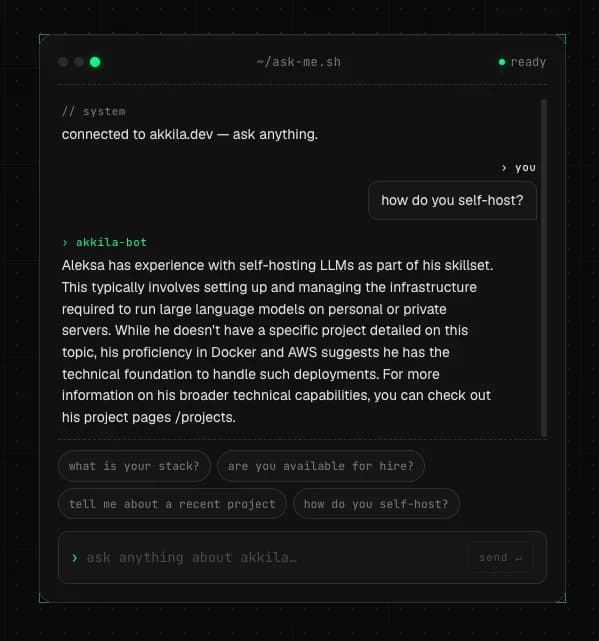
Every developer portfolio needs something that makes a visitor stop scrolling. For me, that something is an AI assistant that answers questions about my work, runs entirely on a home server in my apartment, and costs zero dollars per month in API bills.
This is the story of how I built it. The hardware is modest, the stack is open source (built on llama.cpp and Google's Gemma models), and the tradeoffs are real. If you have a spare PC and a weekend, you can do the same.
Why Self Host an LLM at All
The obvious path was to wire up OpenAI or Anthropic, pay per token, and ship in a few hours. I chose the harder route for three reasons.
First, cost predictability. Portfolio traffic is bursty. A single Reddit post could drain a month of API budget in an afternoon. A fixed home server cannot generate a surprise bill.
Second, the learning. I wanted to understand the whole stack from the GGUF file on disk to the streaming token in the browser, not just call someone else's API.
Third, the talking point. A self hosted Gemma model running on a 10 year old CPU is a more interesting portfolio story than I called the OpenAI API.
If you are building a real product, use a hosted API. The cost per token is genuinely low and your time is worth more. Self hosting is for learning, control, and projects where the infrastructure itself is part of the demo.
The Hardware Reality Check
My home server is an old desktop with an Intel Core i3-6100 (2 cores, 4 threads, Skylake from 2015) and 8 GB of DDR3 RAM. It runs Ubuntu Server with no GUI. The CPU supports AVX2 but not AVX-512, which matters for inference speed.
This is not a serious AI rig. It is the kind of machine you forget you own until someone asks if you have a spare PC. That constraint shaped every decision below.
Picking the Right Model
LLM inference on CPU is bound by memory bandwidth. Bigger models read more weights per token, which means slower output. For a 2 core machine with DDR3 RAM, the sweet spot is small.
I started with Gemma 3 1B quantized to 4 bit (Q4_0) using Google's QAT (Quantization Aware Training) build. The model weights take about 720 MB on disk and roughly 1 GB of RAM when running with a 2K context window. On my CPU it generates around 18 tokens per second, which feels responsive in a chat UI.
After living with it for a while, I upgraded to Gemma 4 E2B, which Google released in April 2026. It is a 5B parameter model with per layer embeddings that act like a 2B model in practice, plus it ships with a draft model for speculative decoding. The team at Unsloth published a detailed deep dive on the Gemma 4 architecture and quantization options that is worth reading if you want to understand the tradeoffs between the different quant levels. The Q4_K_M GGUF weighs about 3.1 GB, which is tight but workable on 8 GB total RAM.
The marketing claim that "E2B fits in 1.5 GB RAM" refers to the LiteRT mobile build, not the standard GGUF format used with llama.cpp. The real Q4_K_M file is 3.1 GB. Plan for that.
Building llama.cpp From Source
The default precompiled binaries of llama.cpp target generic x86_64 for compatibility. That leaves performance on the table for any specific CPU. I built from source on the server itself so the compiler could use every instruction my Skylake supports.
First, the dependencies:
sudo apt install -y build-essential cmake git curl \
    libcurl4-openssl-dev pkg-config g++
Then a dedicated service user, because running anything as root is asking for trouble:
sudo useradd -r -m -d /opt/llama -s /bin/bash llama
sudo mkdir -p /opt/llama/models
sudo chown -R llama:llama /opt/llama
The actual build, run as the llama user:
cd /opt/llama
git clone https://github.com/ggml-org/llama.cpp.git
cd llama.cpp
cmake -B build \
    -DCMAKE_BUILD_TYPE=Release \
    -DCMAKE_C_FLAGS="-march=native -O3" \
    -DCMAKE_CXX_FLAGS="-march=native -O3" \
    -DLLAMA_CURL=ON \
    -DGGML_NATIVE=ON
cmake --build build --config Release -j $(nproc) --target llama-server
The march=native flag is the important one. It tells the compiler to use every instruction available on the build machine. The result is a binary tuned exactly for this CPU, not a generic one.
If you build on a fast laptop and copy the binary to a different machine, it may crash or use instructions the target CPU does not support. Always build on the machine where the binary will run.
Wrapping It in a systemd Service
A one off ./llama-server & in a terminal works for testing, but dies when the SSH session closes. A real service file gives you auto restart, boot persistence, resource limits, and security hardening.
Here is the file I use at /etc/systemd/system/llama-server.service:
[Unit]
Description=llama.cpp HTTP server for Gemma
After=network.target

[Service]
Type=simple
User=llama
Group=llama
WorkingDirectory=/opt/llama
ExecStart=/opt/llama/llama.cpp/build/bin/llama-server -m /opt/llama/models/gemma-3-1b-it-q4_0.gguf -t 2 -c 4096 -b 256 --host 0.0.0.0 --port 8080 --api-key YOUR_API_KEY_HERE --temp 1.0 --top-p 0.95 --top-k 64 --min-p 0.0 --log-disable
Restart=on-failure
RestartSec=5
NoNewPrivileges=true
PrivateTmp=true
ProtectSystem=strict
ProtectHome=true
ReadWritePaths=/opt/llama
MemoryMax=2G
CPUQuota=180%

[Install]
WantedBy=multi-user.target
A few notes on the flags:
The t 2 matches my physical core count. Counterintuitively, using all 4 logical threads on a hyperthreaded CPU often hurts performance because hyperthreads share execution units. Two threads pinned to real cores gives the best throughput while leaving room for the OS and web server.
The c 4096 sets the context window. Bigger means more conversation history, but every token of context costs RAM in the KV cache. 4K is a balance.
The CPUQuota=180% caps the service at about 1.8 cores worth of compute. The remaining 0.2 keeps the OS and other services responsive when the model is generating.
The MemoryMax=2G is a hard ceiling. If the model misbehaves and tries to allocate more, systemd kills it before it takes the whole machine down.
Enable and start:
sudo systemctl daemon-reload
sudo systemctl enable llama-server
sudo systemctl start llama-server
sudo systemctl status llama-server
Tuning Sampling for a Small Model
Out of the box, Gemma 3 1B would start strong, then degenerate around the 4th or 5th message in a conversation. Long responses would slide into repeating ** markdown sequences or stuck loops of single words like let let let let.
The fix was Google's recommended sampling parameters for Gemma 3, which are different from generic defaults:
| Parameter | Generic Default | Gemma 3 Recommended |
|---|---|---|
temperature | 0.8 | 1.0 |
top_p | 0.9 | 0.95 |
top_k | 40 | 64 |
repeat_penalty | 1.1 | 1.0 (off) |
The repetition penalty being off is the surprising one. Gemma was trained to handle repetition naturally, and forcing a penalty often makes things worse.
I also tightened the system prompt to cap output length:
You are a friendly AI assistant on [Your Name]'s portfolio.
Keep responses concise, under 150 words unless asked for detail.
Use plain prose without excessive markdown formatting.
Never invent projects, employers, or dates not listed above.
Combined with a sliding window that keeps only the last 6 messages, the degeneration mostly disappeared.
The Vercel AI SDK Wiring
The Next.js side is short. The Vercel AI SDK has an openai-compatible provider that points at any OpenAI shaped endpoint, which is what llama-server exposes.
Install:
npm install ai @ai-sdk/openai-compatible zodThe API route:
import { streamText } from 'ai';
import { createOpenAICompatible } from '@ai-sdk/openai-compatible';

const llama = createOpenAICompatible({
  name: 'llama',
  baseURL: process.env.LLAMA_BASE_URL!,
  apiKey: process.env.LLAMA_API_KEY!,
});

const SYSTEM_PROMPT = `You are a friendly assistant on [Your Name]'s
portfolio. Answer questions about their work, skills, and projects.
Keep responses under 150 words. Use plain prose.`;

function sanitizeMessages(messages: any[]) {
  let msgs = messages.filter(m => m.role !== 'system');
  const merged: any[] = [];
  for (const m of msgs) {
    const last = merged[merged.length - 1];
    if (last && last.role === m.role) {
      last.content = m.content;
    } else {
      merged.push({ ...m });
    }
  }
  while (merged.length > 0 && merged[0].role !== 'user') {
    merged.shift();
  }
  return merged.slice(-6);
}

export async function POST(req: Request) {
  const { messages } = await req.json();
  const clean = sanitizeMessages(messages);

  const result = streamText({
    model: llama('gemma-3-1b-it-q4_0'),
    system: SYSTEM_PROMPT,
    messages: clean,
    maxTokens: 250,
  });

  return result.toDataStreamResponse();
}
The frontend uses the useChat hook and streams tokens as they arrive. No glue code needed.
The Chat Template Gotcha
The first time I sent a multi turn conversation, the server returned a 400 error:
{
  "error": "Conversation roles must alternate user/assistant/user/assistant/..."
}
Gemma's chat template enforces strict alternation. My sliding window was slicing the message array in a way that sometimes left an assistant message at position 0, which the template rejects. The sanitizeMessages function above fixes this by filtering, merging adjacent same role messages, and dropping any leading non user messages after the slice.
If you switch to a different model family later (Qwen, Llama, etc.), check its chat template requirements. Each family has its own rules about system messages, role alternation, and special tokens.
What I Got Out of It
The chat handles around 15 to 18 tokens per second on the i3-6100. For short portfolio questions ("what frameworks do you know", "tell me about project X"), responses feel instant once streaming starts. Longer questions take 10 to 15 seconds end to end, which is fine for a chat UI.
The whole stack costs me electricity and nothing else. The server idles at 12 watts. A single chat request might briefly hit 35 watts. Even at heavy use, the monthly cost is under a dollar.
More importantly, it gave me a complete picture of the AI stack from the compiled inference engine to the streaming response in the browser. That picture is more valuable than the chat itself.
What's Next
The current setup answers from a static system prompt, which limits how much detail it can give about specific projects. The next step is RAG (retrieval augmented generation), where my markdown files about each project get embedded into a vector index, and the relevant chunks are pulled into the prompt at query time based on what the visitor asks.
For my scale (a few dozen project pages and blog posts), this means a second llama-server instance running an embedding model, a SQLite database with the sqlite-vec extension, and a small retrieval function in the Next.js API route. No vector database service needed.
When that ships, the chat will be able to answer specific questions about architecture decisions, tech stacks, and lessons learned from each project, not just generic "I built X with Y" summaries.
If you want to try this yourself, start small. Get llama.cpp running. Get a single curl request returning text. Then layer the systemd service, then the Next.js integration, then the polish. Each step is a checkpoint where things either work or they do not, and the failure modes are usually obvious.
The best demo for any developer skill is a thing you actually built. A working LLM chat on your own hardware is exactly that.
Resources and Further Reading
The tools and models referenced in this post:
llama.cpp- the inference engine that powers everything- Gemma 3 1B QAT on Hugging Face - the starting model, official Google QAT build
- Gemma 4 E2B GGUF on Hugging Face - the upgrade, built by the llama.cpp team
- Unsloth's Gemma 4 deep dive - the best technical reference on the new architecture and quantization tradeoffs
- Google's official Gemma documentation - model cards, prompting guides, and release notes
- Vercel AI SDK docs - everything for the Next.js integration
@ai-sdk/openai-compatibleprovider - the specific provider for self hosted endpoints
If you want to go deeper on quantization theory, the llama.cpp quantization documentation explains why a Q4_K_M file is smaller and often better than a naive Q4_0.